Google Analytics 4 (GA4) is more than just an upgrade from Universal Analytics—it’s a complete reimagining of how data is collected, analyzed, and used. If you’re wondering what makes GA4 better and why you should switch, this guide outlines the top benefits you should know.
1. Explorations
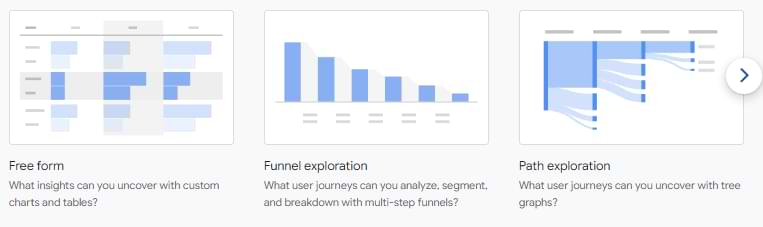
Previously available only in GA360, the Explorations feature is now included in GA4 for all users. It allows advanced analysis with tools like:
- Free form exploration
- Funnel exploration
- Path analysis
If you’re serious about data, you’ll likely spend a lot of time here.
2. Ad Hoc Funnels
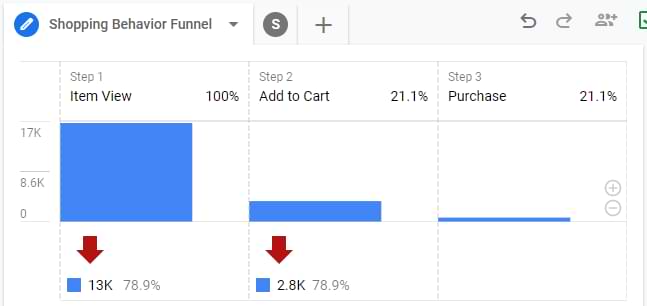
Universal Analytics required funnel setup in advance, with no room for post-hoc analysis. In GA4, you can build, adjust, and apply funnels retroactively—a huge win for market analysts.
3. BigQuery Integration (Free!)
GA4 offers free access to BigQuery exports, previously locked behind GA360. If you’re comfortable with SQL, this opens powerful opportunities for raw data analysis.
4. Data Modeling with Machine Learning
GA4 uses machine learning to fill data gaps caused by cookie restrictions and privacy changes. While powerful, this “black box” approach means you must trust GA4’s modeling without full visibility into how it’s done.
5. Data-Driven Attribution
Instead of the outdated “last non-direct click,” GA4 uses a data-driven attribution model by default. This allocates conversion credit more accurately across the user journey—using your own data.
6. Improved Path Analysis
GA4 improves upon GA3’s limited flow reports. You can now explore forward or reverse paths to see how users move through your funnel, including what actions led to purchases.
7. Flexible Data Model
GA4 treats everything as an event, eliminating hit types and simplifying data collection. You can attach custom parameters for deeper insights—but this flexibility demands a clear naming strategy.
8. Simplified Cross-Domain Tracking
Forget the complex setups in GA3. GA4 allows cross-domain tracking with a simple domain list configuration—no additional code required.
9. DebugView
GA4’s DebugView provides near real-time insight into incoming events and parameters, making it easier to test and troubleshoot your tracking setup.
10. Enhanced Measurement
GA4 automatically tracks events like:
- Scrolls (90% page depth)
- Outbound clicks
- File downloads
- Site search
- Video engagement
This makes GA4 useful right out of the box—even without custom event setup.
11. Privacy-Focused Controls
GA4 is built for a privacy-first future. Key privacy features include:
- Default IP anonymization
- Region-specific Google Signals control
- Event-level ad personalization flags
- Data retention options
- User data deletion tools
12. Event-Based Segments
Unlike GA3, GA4 supports event-based segmentation alongside user and session scopes, enabling more granular audience and report filters.
13. Better Engagement Metrics
GA4 offers more accurate engagement metrics like engaged sessions and engagement time, solving issues where GA3 often reported “0” if a user didn’t navigate to another page.
14. Predictive Metrics
With sufficient traffic and purchase volume, GA4 can generate predictive audiences like:
- Likely 7-day purchasers
- Predicted top spenders
- Likely churners
These can be used for more targeted remarketing.
15. Easier Conversion Tracking
Marking an event as a conversion in GA4 is simpler than goal setup in GA3. You can even configure triggers based on user behavior (e.g., scroll + time on page) to define custom conversions.
16. No Separate View for User ID
Unlike GA3, where User ID data required a separate view, GA4 integrates it into your main reporting property, streamlining analysis across anonymous and logged-in users.
17. Unified App + Web Tracking
Originally launched as “App + Web,” GA4 lets you track mobile and web activity in the same property, offering a holistic view of user behavior across platforms.
18. Increased Limits
GA4 raises several data limits, including:
- Unlimited events per session
- More custom dimensions/metrics
- Up to 25 user-scoped dimensions
- No cap on event volume (though sampling may still apply)
Some new limits (e.g., event name length) do exist, so stay updated.
19. Customizable Interface
You can reorganize reports, navigation menus, and metrics to fit your business needs using the Report Library—making GA4 more tailored to your workflow.
20. Dynamic Reporting Identity
GA4 allows you to change how users are identified (by device, user ID, or Google Signals) on the fly. These changes apply retroactively, affecting calculations, not the raw data.
21. Attribution Model Control
You can now change attribution models (e.g., from last-click to data-driven) across most GA4 reports—and changes affect both historical and future data analysis.
Note: Dimensions like “Session Source” are exceptions where attribution settings won’t apply.
22. Smarter Anomaly Detection
GA4 includes built-in custom insights to automatically detect unusual spikes or drops in data. It’s more accurate and faster than the old GA3 alerts (though not perfect).
Final Thoughts
GA4 is not without its flaws—it’s still evolving, and some features from Universal Analytics are missing. But its benefits are significant and forward-looking:
- Greater flexibility
- Machine learning-powered insights
- Simplified setup
- Stronger privacy compliance
GA4 is clearly designed for the future of digital analytics.